

Watch AHH 2026 LIVE at twitch.tv/CappingTV!
If you're wanting to stream your POV, or cover matches CappingTV can't, see the Broadcasting Guidelines.
Playoff matches will have donation incentives, more information on which will be available soon.
Team Captains Discord (JOIN IT!)
ozfortress uses a Team Captains Discord for its seasonal and off-season competitions. This Discord server allows us to generate Discord channels for each team, as well as channels for each match, notifying you when a match has been generated or is ready to be played. This server makes communicating with the other team easier, and our staff are aware and are just an @AHH Staff ping away from being able to help you - with full context of what is going on. For this and many other reasons, joining the Team Captains Discord is required for captains of teams. Ideally, we would like two captains from each team to join!
Upon joining the Team Captains Discord, you will need to link your ozfortress account with your Discord account. See the On-the-Day Guide below for more information on how to do this.
Seedings
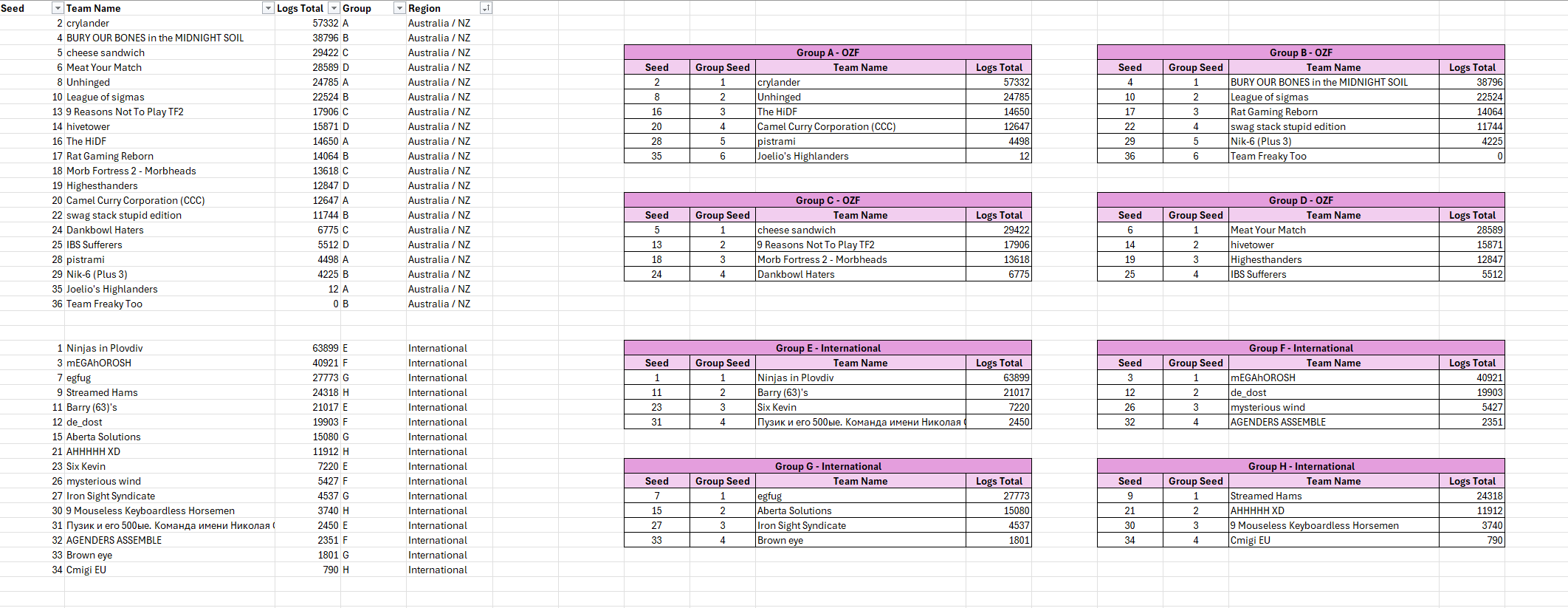
Seeding a competition with a widely varying band of skill across the globe is incredibly difficult, especially for a one-day event. Keeping games super competitive isn't always possible without multiple stages for each region, which is hard to do for an event running entirely in one day. We have chosen to run a Group Stage splitting teams into eight (8) groups, four (4) "OZF" (all Australian/New Zealand teams), and four (4) international groups. The team with the highest ranking after the three (3) rounds of Group Stage will proceed to Playoffs.
Seeding Metric Used
Because of the difficulty of knowing not only players on international teams as an AU/NZ staff team, but also how those teams compare to our OZF teams and vice-versa, we have opted to combine the total amount of logs per team, and use that metric to rank teams from 1-36. Using those rankings, we've split the seedings into two lists, "OZF" and "International". From there, we have split these lists into groups.
Tournament Format
AHH 2026 has two stages, Group Stage, and Playoffs.
Group Stage
The Group Stage will make use of either Round Robin or Swiss systems depending on the final size of each group, at this stage Round Robin will be used for all groups except for Groups A and B, but this may change if group sizes change. Round Robin has a distinct advantage of allowing us to generate matches all at once, as all teams will eventually play each other. Swiss is more ideal when we need to ensure a set amount rounds, but have too many teams in a group for all teams to be able to play each other within that amount of rounds.
Playoffs
Playoffs will use the Single Elimination system. The top eight (8) teams from the Group Stage will compete through the Quarter Finals, Semi-Finals and the Grand Final to decide a winner, with each round eliminating teams that lose.
Schedule
The schedule for Australian Hightower Highjinx 2026 is tight, and only allows for a small amount of time between matches, hence why we have given a little more time between Group Stages and Playoffs.

Please Note: The schedule is more of a loose guide - we will endeavour to keep everything on-schedule, but we will take time/reclaim time where we can and where we need. We will need a slight break between Group Stages and Playoffs to sort through technical limitations of the implementation we're using for Playoffs.
Match Procedure
When each round starts, teams will be pinged in their newly generated Team Captains Discord Match Channel. Teams will need to communicate who will be booking the server via your Captains Discord Match Channel, with the base expectation that the Home team will book the server. International teams will need to discuss and reach a decision on which server gives the best ping comparable ping between teams. Teams will need to both load the map and execute the config before playing. We have allowed for extra time between matches, but the scheduling is still tight.
Please start each game as soon as possible, as there is a tight schedule, and delaying will delay the entire event. If the other team has not shown up five minutes after the server has been booked, ping @AHH Staff to claim your forfeit win. Please DO NOT delay for the other team as a courtesy.
After the match is over, please submit and confirm the scores immediately. Posting of logs is mandatory. See the On-the-Day guide below for information on how to submit scores.
Score Tiebreaking
Please see 1.4. Match Win Conditions & Tiebreakers for information on tiebreaking for PLR (Payload Race) maps on the day. You will need to know this, so if you skip everything else, read over this please.
Forfeiting Matches & "No-Show" Teams
Any forfeit in AHH 2026 will result in your teams removal from AHH 2026, and your entire roster will not receive participating/placement medals. For more information, see our ruleset.
Servers & Reserving/Booking Servers
Our main provider for this event is au.serveme.tf. For international teams wishing to play on servers closer to them when playing against other international teams, na.serveme.tf (North America), serveme.tf (Europe) and sea.serveme.tf (Asia) all have the configs and maps for this event, and should work identically to au.serveme.tf (which is used as an example in the On-the-Day Guide below).
Server Selection
For Server Selection rules, see 6.1. Server Selection in our AHH Ruleset. To summarize though, if an OZF/Australian or New Zealand team is in a match, the default server of Sydney Australia (provided by au.serveme.tf) should be used. If two international teams are playing, they can discuss and find a ping-appropriate server through NA/EU/SEA serveme servers. If serveme servers are not working for you for whatever reason, notify/ping @AHH Staff via your Captains Discord Match Channel, and we may allow matcha.tf or TF2 Quickserver to be used.
au.serveme.tf Usage for Non-AHH Games
On the day, we will need all au.serveme.tf servers for AHH matches. As such, we will be closing any servers opened that are not for AHH matches. Please use matcha.tf or TF2 Quickserver for non-AHH games on Saturday.
On-the-Day Guide
Team Captain Discord
We require captains of teams to join this Discord so we can help teams with organising their matches, communicating with other teams, resolving issues, and notifying you of when your match is ready to be played, as well as notifying you of any issues. Below is a quick guide to using the Team Captain Discord.
- Join the Team Captain Discord.
- Link your ozfortress account with Discord.
- Make sure to go to
#setupand "Sync with ozfortress".
Playing Your Matches & Submitting Scores
- When AHH 2026 is ready and generated in the Discord, you will receive roles which grant you access to your team and match channels. When match channels are generated close to the time each round is meant to start (see the Schedule above), you will see your match channel appear, with a ping notifying you and your opponents!
- Organise who is booking the game server for your game. If one team is an OZF team/from Australia/New Zealand, you will have to play on a server from Sydney Australia, which can be booked through au.serveme.tf. If both teams are international teams, you can book a server closer to you through one of serveme's regions, na.serveme.tf (North America), serveme.tf (Europe) and sea.serveme.tf (Asia) .
- For server administrators/those who reserved/booked the server, you will need to change the map and or config, if you didn't already set it while reserving the server. See "Reserving Servers/Booking Servers & Commands" below for information on how to do this.
- Once your server is setup, play! Please ensure that if you are playing a Payload Race (PLR) map and your match ends by timelimit, that you notify/ping
@AHH Staffin your match channel, take a screenshot of the cart progress, and have the logs.tf link from your match ready to present. You can find this link in chat after the match ends, or on your profile at logs.tf. For more information, see "Tiebreakers" below. - Submit your scores. In your Discord Match Channel, at the very top of the channel should be a link to the match page on ozfortress.com. Please click it, sign in if you aren't already signed in to our website, and submit the score in the score field, ensuring that you submit the score according to 1.3. Scoring in our ruleset (PLR as 1-0 to the winning team, KOTH as 3-0/3-1/3-2 to the winning team).
- Once you have submitted scores, ensuring that you have notified/pinged
@AHH Staffin your Discord Match Channel if your match needed a Tiebreaker to resolve who won, please wait patiently for notification/pings about your next match.
Tiebreakers
Please see 1.4. Match Win Conditions & Tiebreakers for information on tiebreaking for PLR (Payload Race) maps on the day. You will need to know this, so if you skip everything else, read over this please.
Playoffs Single Elimination Home/Away Coin Flip
As Playoffs has advantaged pick/bans, and we are running groups, we will coinflip to decide who is Home & Away in each matchup. This is done when we generate the matches. This is about as fair as we can make it.
Reserving Servers/Booking Servers & Commands
For a more comprehensive guide on booking au.serveme.tf servers, see the "Book a server" guide. However, all you need to know is below. We ask that you let someone who knows a little bit about controlling league servers run the show, but if you don't have someone, the guide below should help.
Commands
Depending on which map you are playing (and assuming you have reserved/booked a server), you will want to:
- Get the "RCON" string, and put it in your in-game console, or if you want, you can control your server from the "Web RCON" from your reservation page.
- Change the map to the correct map for the round you are playing.
- Execute the correct config depending on if you are playing a PLR/KOTH map.
- You should be all set. If for whatever reason your server doesn't end on timelimit, please rerun/execute the server config again.
Map Change Commands
rcon changelevel plr_hightower
rcon changelevel plr_hightower_event
rcon changelevel koth_snowtower
Server Configs Commands
rcon exec ahh_plr
rcon exec ahh_koth
- serveme
- KritzKast
- CappingTV
- callouts.tf
-
noob pugs
Community-run Newbie Pugs
 Join our Discord
 Follow us on X
 Support us on Patreon
 Subscribe to us on YouTube
 Join our Steam Group
 Like us on Facebook